


Hearing Aids & Technology
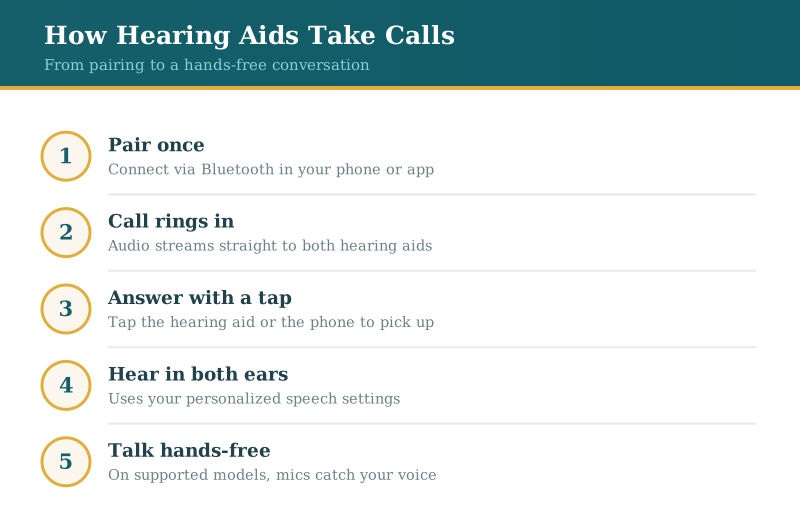
Once that link is set up, a call arrives in both ears at once. You can answer with a tap, leave the phone in your pocket or on the counter, and hear the other person with the same settings your hearing aids already use for speech. For anyone who has spent years pressing a handset against one ear and still missing half the words, the difference is hard to overstate.
The specifics — which phones work, whether you can talk hands-free, how you answer — vary by model and by brand. If you want it shown on your own phone, our team in San Mateo and San Carlos can demonstrate it during a hearing aid fitting.
'Hearing aids only make things louder'
This is the belief underneath most of the doubt about phone calls, and it describes hearing aids from a couple of decades ago more than the ones on shelves now. Today's devices are small computers. Alongside amplifying and shaping sound to match your hearing, many contain a Bluetooth radio, the same technology that connects wireless earbuds and car stereos. That radio is what lets them receive a phone call, a video chat, or turn-by-turn directions and play it through the speakers already sitting in your ears. Amplification is still the core job; call streaming is a feature layered on top.
'You have to hold the phone to your ear'
With a Bluetooth connection, the phone itself can stay put — in your pocket, your bag, or across the room within range. When a call comes in, the audio streams to the hearing aids and you hear it in both ears rather than one, which many find easier to follow. Hearing a caller with both ears, using the personalized settings your hearing aids apply to in-person speech, is a real step up from a phone speaker held at arm's length. Some models let you answer by tapping the hearing aid or a phone app; others still want a tap on the phone screen.
'Only top-of-the-line models can do it'
Wireless streaming used to be a premium extra. It has spread widely enough that you now find it well below the flagship tier, though the details differ from one maker to the next. Across the major hearing aid brands we fit, streaming support, battery behavior during calls, and hands-free options each vary. Rechargeable models, in particular, tend to build streaming in as standard. The useful question is less 'can any hearing aid take calls' and more 'which one matches how you use your phone day to day' — a fit we work out together rather than guess at.
'It only works with an iPhone'
For a while Apple was ahead here, and some older hearing aids paired cleanly with iPhones while treating Android as an afterthought. That gap has closed considerably. Many current hearing aids stream calls and audio from Android phones too, and a growing number support true hands-free calling on both platforms, so your own voice is picked up by the hearing aid microphones instead of the phone. Compatibility still depends on the specific hearing aid, your phone model, and its operating system version, which is worth checking before you buy rather than after.
'The person on the other end won't hear me well'
This one has a kernel of truth that depends on your setup. In a hands-free arrangement, the hearing aid microphones pick up your voice, which is convenient but can sound different to the caller depending on the room and background noise. On models without hands-free calling, you speak toward your phone as usual while listening through the hearing aids, and your caller hears you through the phone's own microphone. Neither approach makes you sound robotic or produces an echo when it is set up correctly. If a caller keeps saying you sound distant, that is usually a settings or positioning issue worth sorting out at a follow-up, not a flaw in the technology.
'Pairing it all sounds too complicated'
The setup is a one-time task, and it is the part we handle with you rather than leave to a manual. Pairing generally means opening your phone's Bluetooth or the manufacturer's app, selecting the hearing aids, and confirming — closer to connecting a wireless speaker than programming a computer. During your appointment we connect the devices, place a test call, and show you how to answer, adjust volume, and switch between the phone and the room. If something drifts later, a quick repair and service check usually puts it right. None of this asks you to be comfortable with gadgets, and it is a common request among the older adults we fit.
Frequently asked questions
Questions patients ask us
Do all hearing aids stream phone calls?
Not every model, but a large and growing share do. Streaming is now common well beyond premium devices, especially among rechargeable models. Because support and features differ by brand and price, it is worth confirming a specific model handles calls the way you want before you commit.
Can I use hearing aids with an Android phone?
This has changed a lot recently. Streaming once favored iPhones, but many current hearing aids connect to Android phones for both calls and audio, and some offer hands-free calling on either platform. The one caveat is version specifics — your phone's model and operating system can affect what works, so check against the exact hearing aid.
Will callers hear me clearly, or do I still need to talk into the phone?
It depends on whether your hearing aids offer hands-free calling. With hands-free, the hearing aid microphones capture your voice and the phone can stay put. Without it, you listen through the hearing aids but speak toward the phone as usual. In both setups, callers should hear you normally once everything is configured.
My current hearing aids don't have Bluetooth — what are my options?
You have a couple. Some older hearing aids can pair with a small intermediary streamer that bridges them to your phone, which your audiologist can walk you through. If yours simply predate wireless calling, it may be time to talk about newer devices; a hearing evaluation is a sensible first step, since your current hearing needs guide which streaming-capable models suit you.